
Blog
how to activate windows 11
How to Activate Windows 11: A Complete and Practical Guide
Activating Windows 11 is an essential step to ensure you have access to all the features and updates offered by the operating system. In this article, we’ll explain how to activate Windows 11 in a simple and effective way, as well as answer the main questions users usually have. Follow our step-by-step guide and make the most of your experience with the new Windows!
Step-by-Step Guide to Activating Windows 11
Windows 11 can be activated in several ways. Check out the most common method below, which uses a product key.
1. Check the System Requirements
Make sure your device meets the minimum requirements for Windows 11.
Verify that you have a valid product key.
2. Go to Settings
Click the Start button (Windows icon) on the taskbar.
Select Settings (gear icon).
3. Navigate to the Activation option
In the Settings menu, click Update & Security.
Select Activation from the side menu.
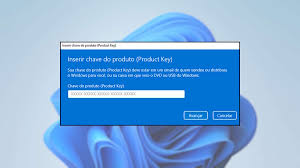
4. Enter the Product Key
Click Change product key.
Enter the 25-character product key and click Next.
5. Complete the Activation Process
Follow the on-screen instructions to complete the activation.
After activation, you will see a message confirming that Windows 11 is activated.
Frequently Asked Questions
What should I do if the product key doesn’t work?
If your product key isn’t accepted, check that you entered it correctly. If you continue to have problems, consider contacting Microsoft Support.
Can I activate Windows 11 without a product key?
Yes, you can use Windows 11 without activation, but some features will be limited, and you’ll see a watermark on your desktop.
How do I know if my Windows 11 is activated?
You can check the activation status in Settings, under the Activation section, where it will show whether Windows is activated or not.
Conclusion
Activating Windows 11 is a quick and simple process that ensures access to all system features. By following the step-by-step guide we’ve provided, you’ll be able to activate your Windows 11 without any trouble. If you have questions, check the FAQs or contact Microsoft Support. Enjoy your new operating system and its innovative features!
Purchase an original license at: https://casadosoftware.com.br
Related content
View all
Want to buy a genuine license with automatic delivery?
Check our products and activate in minutes.